Since the days are getting shorter I decided to pull out the sound activated flash trigger again , and this time I added a mirror to see things from a different angle .
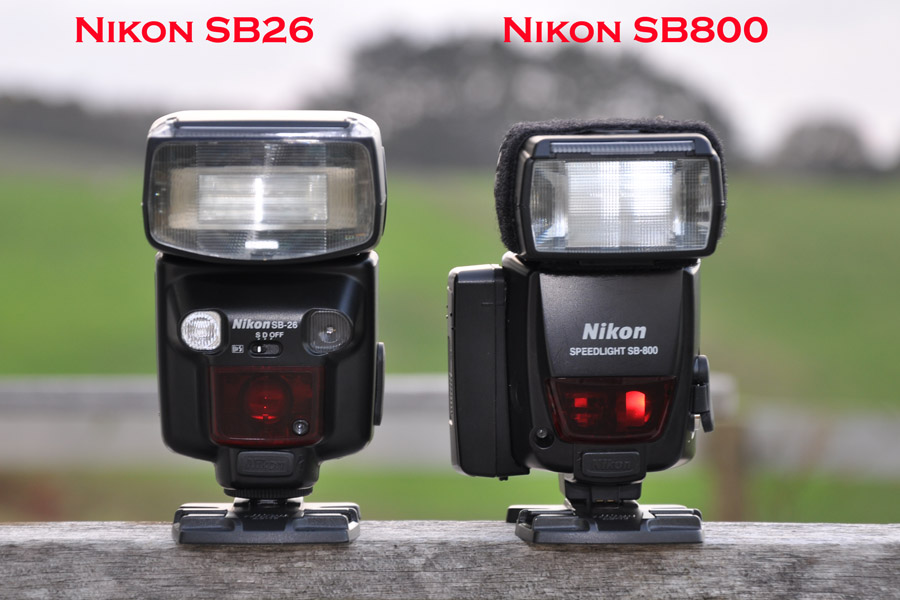
I recently bought a used Nikon SB26 in very good condition . I decided to test out the "SU4" mode on my SB800 compared to the built in flash trigger on the SB26 . With the SB800 it uses the sensor on the side , next to the battery compartment , to act as a trigger when another flash is fired while the SB26 has a separate flash trigger 'eye'
I set them up facing away from each other and made sure they couldn't trigger each other . I had another SB800 on my D50 and it was set to 1/128th power in manual mode so I had the weakest possible flash output . I tried one reasonably close [ about 8-10 metres ] . They were both set at 1/16th power .
With the lens fixed at 50mm I moved back and they both triggered ok at this distance .
I moved back a bit more until only the SB800 triggered .
Then I moved forward to where they would both trigger ....
At this stage the sun popped out from behind a cloud and only the SB26 triggered - I hadn't changed my distance .
Since I was using the D50 which has the advantage of an electronic sensor/shutter and can synch flash at any speed using 'realsynch' flash I did some extreme shutter speed tests . I mounted the old SB24 and set it at its minimum power of 1/16th and tried at faster shutter speeds .
From what I've seen so far neither system is superior in all ways . The SB26 seemed to handle sunlight better than the SB800 but the SB800 triggered at a greater distance in the shade .
On a discussion about this blog on photocamel.com I was referred to an interesting site where you can play with the settings of a virtual camera and see the results on an image on the screen . Until I do some decent sample images I think that is a very good place to start .
I've been playing around with ideas to add to a well known image . Since I never had anyone to model for me initially I had to set everything up and try to look down the lens with the mirror and hope for the best . First you set the camera to manual mode , iso 200 , 1/200th [ max flash synch mode for the D90] and then dial in aperture until it shows "-2" on the meter . The light kept changing so I was at F18 for a while , then the sun went behind the clouds and I was down to F9 , then things got bright again and I had to move to f22 ... with clouds you have to keep checking where the ambient is sitting according to the meter and make adjustments .
Of course I kept the image of my face small until I could find a better looking model ;)
Jessica is from Canada , on a working holiday in New Zealand . She also has a Nikon D90 and helped out with my last wedding . She wants to be a traveling photographer one day .
She agreed to help me after work on Sunday afternoon and I think we got some good shots . None of these images have had any photoshop work done on them , I prefer to be able to say they are straight out of the camera . [ one or two were cropped ] .
Occasionally you get a lucky accident in the background .
Jessica suggested most of the variations [ luckily]
Then there's my twist on the image . I wanted something different and while I was thinking about the prospect of someone getting their hand cut on the sharp edges [ I had put glue on the edges for safety ] , I realized that the blood could possibly look like 'sweat' and if it dripped in the right place 'tears' so after shopping around for the right colour paint I came up with "Blood: ' Sweat' and 'Tears' " . [Update: Nobody on the forums really liked these images with 'blood' in them so it was a bit of a learning experience - I got a little carried away with the concept without actually thinking about what other people might think of the final images ]
Then there were one or two others that were interesting like "Turtle-neck" [ Update : This was the unanimous favourite on 7 different forums ]
And Jessica also suggested we do a 'photographer' shot as well ....
It's not easy , having the paint in the right place , and the lighting , getting the model to line it all up properly , hold it there and get the right facial expression all at the same time - something to work on next time I suppose ! We actually ended up with better contrast with the ambient at -2.3 .[ update , even though ''-2.3'' looked good on the camera screen and the computer it printed out way too dark - next time I won't go below -1.7 for the background ]
This site is a combination of tutorials from various forums including photocamel , nikoncafe, hellophoto and nikongear and is open to submissions . Hopefully we can round up "The best of the forums" tutorials to help beginners interested in photography . If you would like to add a useful article please contact me




 Posts